Access Your NetApp Clustered Data ONTAP Logs From Your Browser

Getting logs from many systems can be a laborious and sometimes even painful process. You may have to view them semi-interactively from the command line. You may need to pull them off the system via FTP, SFTP, NFS, or some other protocol and then open them in a text editor (often after unzipping the downloaded files). Sometimes there’s a web GUI for viewing the logs, though this often provides only a display that can be copied/pasted & not the backing file(s) themselves.

In the past it’s been just as tedious to get logs off of NetApp FAS systems, but starting with clustered Data ONTAP 8.1.1 NetApp began providing web (HTTPS) access to easily download log files from the controllers. Initially, this access was not enabled by default and needed to be manually configured. Starting with 8.2.1 it is now enabled and accessible out of the box. It’s not the prettiest of interfaces, but it’s quite workable, and in addition to logs it also gives you access to core (crash) files if and when those occur.

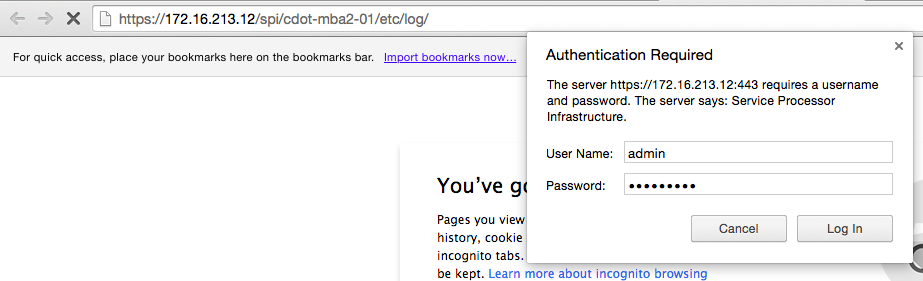
When it’s enabled, all you need to do is navigate to the right URL and enter the appropriate credentials. The format of the URLs looks like this:

SPI_Login_Prompt

SPI_Logs

The service is accessed via the cluster management IP (or name – you can use the friendly DNS name and not IP), but the logs you’ll be going to are those on each individual node in the cluster. This is giving you access to far more logs than are available through the normal event logs displayed in OnCommand System Manager or via the CLI. In a later post, we’ll go through some of the more interesting and important log files you can access.

With Data ONTAP 8.2.1, the built-in admin account has access to this service by default. If you would like to create another user only for accessing these files (for a junior operator, for example) it’s a simple matter:

  • security login create -username <logviewer> -application http -authmethod password

And then enter the password for this new user account.


If you are running versions of clustered Data ONTAP between 8.1.1 – 8.2, here are the steps you’ll need to follow to enable this functionality:

  • vserver services web modify -vserver * -name spi -enabled true
    • This enables the SPI service on all vservers (only necessary for the cluster and node management vservers)
  • vserver services web access create -name spi -role admin -vserver <cluster-name>
    • This grants the admin role access to the SPI web service.
  • vserver services web access create -name compat -role admin -vserver <cluster-name>
    • This grants the admin role access to the compat web service.
    • In my testing, this setting was not strictly necessary for accessing the log files, but it is recommended by NetApp Support.

The official NetApp Knowledge Base article for setting up access is here: https://kb.netapp.com/support/index?page=content&id=1013814


Looking forward to NetApp Insight EMEA 2014

In a little more than one week I’ll be getting on a plane to head to Berlin for NetApp Insight EMEA 2014. I’ve never been to Europe, other than to the UK (does that *really* count as Europe?), so I’m quite looking forward to the experience. While I don’t expect to have a lot of time to sightsee, I definitely plan on exploring the city as much as I can. After all, how can one visit your ancestral homeland & not at least take a peek around?

This year the conference is being held November 17th – 20th at CityCube Berlin, and it marks the first conference for our European customers (following the first US conference for customers last week in Las Vegas). I expect to feel just as much energy and excitement from them as we did from the customers who attended Insight US in Las Vegas last week.

Whether you’re a customer, partner, or NetApp employee there will be a ton of opportunities to learn and things to do at Insight:

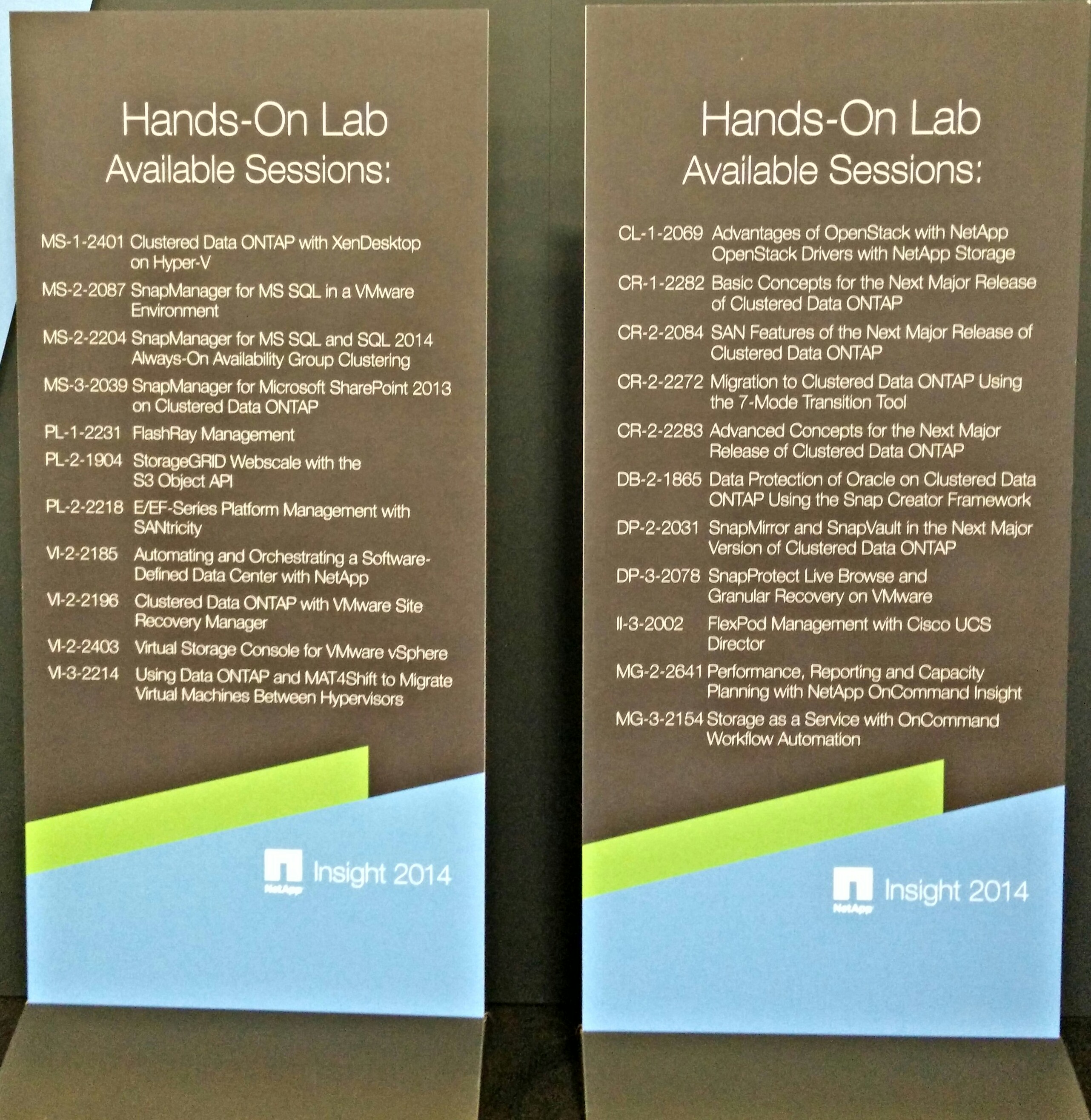
  • 22 Hand-on Labs
  • 7 on-site NetApp technical certification exams
    • NS0-145 NetApp Certified Storage Associate (NCSA)
    • NS0-170 FlexPod Design
    • NS0-155 NetApp Certified Data Administrator (NCDA) for Data ONTAP 7-Mode
    • NS0-159 NetApp Certified Data Administrator (NCDA) for clustered Data ONTAP
    •  Ns0-502 NetAp Certified Implementation Engineer – SAN for Data ONTAP 7-Mode
    • Ns0-504 NetAp Certified Implementation Engineer – SAN for clustered Data ONTAP
    • Ns0-510 NetAp Certified Implementation Engineer – Backup and Recovery
  • NetApp University Get Certified Prep Sessions – to help you prepare to take a NetApp certification exam
  • Insight Central – a solutions exchange populated with over 50 partner booths, NetApp booths, Media Hub, and more
  • Hundreds of Breakout Sessions
  • Plus General Sessions, networking events, parties, and more

NetAppInsightHoL

I’m lucky enough to attend the conference because I have a couple sessions of my own to present:

  • II-3-2000 – OpenStack for the Enterprise: FlexPod with Red Hat Enterprise Linux OpenStack Platform
    • Wednesday, Nov 19, 11:15 AM – 12:15 PM in M7 – Level 3
    • Thursday, Nov 20, 1:30 PM – 2:30 PM in M5 – Level 3
  • II-2-1931 – NetApp and Cisco Validated Designs for Service Providers and Large Enterprises
    • Wednesday, Nov 19, 8:30 AM – 9:30 AM in R13 – Level 3
    • Wednesday, Nov 19, 1:45 PM – 2:45 PM in M6 – Level 3

If you haven’t registered for Insight yet, or haven’t scheduled all of your sessions yet, there’s still time! Go here and get registered: https://netappinsight2014emea.activeevents.com/portal/newreg.ww

You can also get more information on the main website: http://www.netappinsight.com.

Whether you’re attending in person or not, be sure to follow the Twitter hashtag #NTAPinsight: we blew up the feed pretty well last week for the US conference and we’re going to do the same for Europe!

If you are attending Insight, please say hello – I’m looking forward to meeting many of you either at my sessions or at other points throughout the conference!

FlexPod Datacenter with NetApp All-Flash FAS and VMware Horizon (with View)

NetApp and Cisco, in conjunction with VMware, have recently released a NetApp Verified Architecture (NVA) Design Guide for deploying VMware Horizon View in a FlexPod environment: NVA-1110-FP-DESIGN. This is the first official FlexPod document for running VMware’s virtual desktop infrastructure software in approximately 2 years, and highlights the latest technologies.

NVA

An NVA is the NetApp equivalent of a Cisco Validated Design (CVD): a pretested, preintegrated and verified architecture that includes prescriptive guidance to help improve the efficiency and efficacy of architecting and implementing NetApp solutions. An NVA can include one or more documents focused on design, deployment, operations, or sizing. This NVA solution will include both a Design Guide (the current document) as well as a Deployment Guide (this document will be published shortly).

This NVA release focuses on the following software versions:

  • VMware Horizon View 5.3.1
  • VMware vSphere 5.5
  • NetApp clustered Data ONTAP 8.2.1
  • Cisco UCS Manager 2.2(1c)

The hardware in this release was comprised of

  • NetApp All-Flash FAS8060 with DS2246 disk shelves
  • Cisco Nexus 5548UP switches
  • Cisco UCS 6248 Fabric Interconnects
  • Cisco UCS 5108 chassis with 2208XP IOXM
  • Cisco UCS B200 M3 servers

In addition to using the latest software versions (at the time verification testing began), this is the first FlexPod NVA/CVD for VMware Horizon View to use clustered Data ONTAP, as well as the first to use the new All-Flash FAS storage arrays.

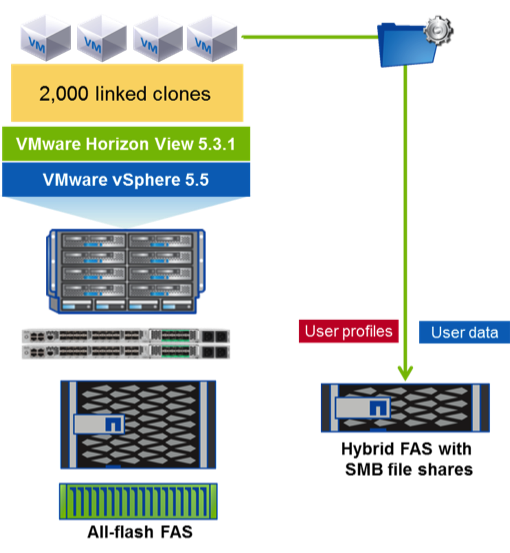
This verified architecture utilized a single all-flash HA pair/cluster to easily support 2000 concurrent desktops. A second hybrid HA pair/cluster was used for the infrastructure and user data workloads as an example of using distributed storage clusters. Alternatively, both desktop and infrastructure/user data workloads could have been run on the single all-flash HA pair alone given the performance and capacity headroom available in the system as configured.

NVA-1100-FP_architecture

NetApp has been implementing flash technologies for what are now known as hybrid storage arrays (combining traditional SAS or SATA hard drives with flash) since 2009 and solid-state drives (SSDs) since 2010. In 2013 NetApp entered the all-flash array market with the launch of the EF540, an all-flash model of the E-Series storage arrays.  Now in 2014 NetApp is shipping all-flash configurations of its most popular product, the FAS series arrays.

In hindsight everything is obvious, including how well Data ONTAP’s core technologies like its Write Anywhere File Layout (WAFL) and use of NVRAM, enhance an all-SSD environment. With Data ONTAP, all incoming writes are cached in memory, logged to NVRAM in both the primary and partner controllers, and acknowledged back to the host immediately to provide very low response time and low latency for write operations. Data is then flushed from cache to disk (in this case SSD) using algorithms to optimize the data layout and coalescing writes (including highly random writes as are typically seen in virtual and virtual desktop environments) into large sequential stripes of across all disks at once. As WAFL always writes to free space rather than performing in-place overwrites, it provides a natural form of wear-leveling for the SSDs while still leveraging the garbage collection and wear-leveling within each SSD itself. These features help extend the life of each SSD so that NetApp is able to offer three-year standard warranty and up to an additional two-years of extended warranty (five-year warranty total) for SSD with no restrictions around number of drive writes. In addition, the thread parallelism and multi-core support continually enhanced in the last several versions of Data ONTAP combines with the powerful multi-core CPUs used in the FAS8000 series controllers to provide truly impressive l0w-latency, high IOP performance.

NetApp has used Login VSI, the industry-recognized standard for VDI workload testing, to perform an extensive series of verification testing of the All-Flash FAS f0r multiple VDI architectures. Each of the following technical reports are loaded with test plan details and results which demonstrate the combination of sustained high IOPs and low latencies consistently seen throughout the testing:

  • NetApp All-Flash FAS Solution For Nonpersistent Desktops with VMware Horizon View (TR-4307)
  • NetApp All-Flash FAS Solution For Persistent Desktops with VMware Horizon View (TR-4335)
  • NetApp All-Flash FAS Solution For Persistent and Nonpersistent Desktops with Citrix XenDesktop and XenApp (TR-4342)

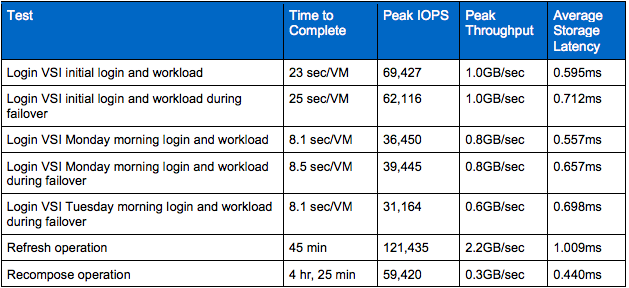
For the architecture used by this NVA solution, here is one sample of the test results:

Screen Shot 2014-11-05 at 11.45.31 PM

As mentioned at the beginning of this article, keep an eye out for the matching NVA Deployment Guide for this solution coming soon!


VMware VCAP Recap

Writing about your certification experiences seems to be de rigueur for tech people, but I’ve struggled to come up with something interesting to say about my own. The usual format for this type of blog post seems to be:

  • write a brief paragraph or two on how you prepared for the exam
  • list out the resources that you used while studying (usually a long list) & provide URLs
  • write another paragraph or two on your experience at the testing facility (which my or may not be related to the exam itself).
  • declare your victory over the exam, or admit your temporary defeat

This is a fine format, and I’ve enjoyed most of the hundreds of articles that have followed that format because ….well, I’m not entirely sure why. I suppose it’s a bit of a tradecraft perspective where, no matter how boring otherwise, we each appreciate the minutia and routines of our own industries. In the tech world – particularly the VAR world I inhabited for several years – certification exams are certainly a routine experience.

But reading about someone else’s experience is usually more interesting than writing about your own. I’m going to try to take a slightly different tack in this post which will be less boring for me yet hopefully still interesting to you.

Here goes:


Victory:

I have passed all of the VMware Certified Advanced Professional (VCAP) exams available to date, with the exception of the most recent DCD/DCA based on vSphere 5.5 (I haven’t gotten around to them yet but still may before the vSphere 6.0 exams are ready). To be explicit, I currently hold:

  • VMware Certified Advanced Professional on vSphere 4 – Datacenter Administration (VCAP4-DCA)
  • VMware Certified Advanced Professional on vSphere 4 – Datacenter Design (VCAP4-DCD)
  • VMware Certified Advanced Professional on vSphere 5 – Datacenter Administration (VCAP5-DCA)
  • VMware Certified Advanced Professional on vSphere 5 – Datacenter Design (VCAP5-DCD)
  • VMware Certified Advanced Professional – Desktop Administration (VCAP-DTA)
  • VMware Certified Advanced Professional – Desktop Design (VCAP-DTD)
  • VMware Certified Advanced Professional – Cloud Infrastructure Administration (VCAP-CIA)
  • VMware Certified Advanced Professional – Cloud Infrastructure Design (VCAP-CID)

Exam recommendations:

  • Manage your time.
  • Pace yourself.
  • Read fast.
  • Read carefully.
  • Make a decision, choose an answer, and move on.

Resources:

I read the blueprints. What do I recommend you do? Go read the blueprints. Don’t bother looking at anything else until you’ve done that.

I went through the list of topic areas in each blueprint and checked off each item I was comfortable with, highlighted any I was completely in the dark on (like AutoDeploy), and did nothing to the ones that I probably knew but wasn’t 100% sure on. Then I did the math to try to figure out where I could get the most return on my time investment, and just focus my studying there.

What should you study? The blueprints tell you. Yes, there are a ton of other resources out there in the community, but the materials listed in the blueprints are what you need & what I would recommend. If you really want to look at additional resources, many people have put together lists of them for you – go do a Google search on “VCAP-[XXX] resources” or similar & I promise you’ll find more than you’ll ever have time to read/watch and absorb.

I must point out that the Zachman article on “Conceptual, Logical, Physical: It is Simple, which is listed in the blueprints, is absolutely foundational and the single most important thing to read for any of the design exams. If you’ve been working with VMware products enough to want to take multiple $400 3+ hour exams, you should already have a good start on your technical knowledge, but the concepts and perspectives laid out by Zachman are nowhere near as commonplace in the market. It’s also wonderfully clear, concise, and efficient – go read it.


How I actually got here:

I used to dislike certifications and didn’t trust most certified individuals to actually have sufficient knowledge or skill within their area of expertise. Then I came to realize the marketing value of certifications but found them personally boring. Now I’ve become a firm believer in the career benefits of certification, remain wary of viewing a certification as being equivalent to validation, and find myself truly enjoying the certification process.

After more than 15 years in the IT field, I was working  at a value-added reseller (VAR) & consulting company and had put together a decent resume of certifications. There are always more certifications to obtain, even disregarding the new versions that come out to which vendors incentivize you to upgrade, so it’s easy to collect quite a few. It’s easy, but it’s not necessarily cheap, and this is where working for a VAR is a great benefit: a VAR, more than any other type of employer, understands the business benefits of having highly-certified people on staff.

Up to this point my certifications were generally “professional” level rather than advanced or expert, and I found myself assuming these higher-level exams were too difficult for me to obtain without significant preparation or studying. Most of these advanced exams were of only moderate interest to me and weren’t applicable enough to my role to justify the time & expense involved in pursuing them. Then along came something called VMware Certified Design Expert (VCDX) which changed things for me.

While networking was my first real IT interest, it was working with VMware virtualization starting around 2004 that actually transformed my career and ignited my passion. Here, finally, was an advanced certification track that I  wanted to pursue, and for which I had a strong background.  I planned to take the prerequisite VMware Certified Advanced Professional (VCAP) exams as soon as I could, but also knew that I had to seriously prepare for them given the content of the blueprints, the presumed higher calibre of the exam and especially after reading about the number of experienced people who were having significant issues passing the exams. So I delayed taking the exams because I didn’t think I was “good enough” and I didn’t want to waste $400 to fail an exam. Even if my employer was picking up that tab, it’s not a small investment, particularly when also factoring in the equivalent of half a workday to take the exam. Higher investment = higher pressure.

Then at VMworld 2012 there was a special giving 50% off of any VMware exam scheduled during VMworld – but with the surprising allowance that the exam didn’t need to be taken at or during VMworld and could instead be scheduled for as late as the end of November 2012. By this time the vSphere 5 versions of the exams were available, in addition to the original versions on vSphere 4, for both the VCAP-DCA and the VCAP-DCD exams. With the 50% discount on the table, I decided it was now or never and booked all four exams spread out across October & November. To warm myself up, I also booked both versions (4 & 5) of the VCP-DT for September. I knew there was still a lot of studying I needed to do for the exams so I spaced them out over almost 3 months in order to give myself time to focus on studying for each exam.

Despite my planning, in the end I wound up studying for, at most, a few hours for any of the exams. What I had going for me, though, was that 50% discount: it allowed me to decide to take each exam as if it were only a practice test instead. This meant going into the exam with an entirely different mindset: to find out what the exam was really like, where my actual weaknesses were and where I should study, rather than fixating on passing on the first try. I could just focus on the experience rather than the result – on the journey rather than the destination – and so I went in to each exam with very little pressure, and a real sense of enjoyment of the process.

And you know what? It worked. When I focused on passing the exams, I was also focused on how difficult (I thought) the tests would be – and things are often harder in your own head (or at least in mine) than they are in reality. By focusing  on the experience & enjoying myself, those “practice tests” wound up being all I needed to pass.

Now that doesn’t mean those tests weren’t hard: they were, and are, and no, not everyone can pass them on the first try. But they weren’t as hard for me as I had thought they would be, and it was my own doubts that were a bigger barrier to my success than anything else. I didn’t really beat those doubts ahead of time – I just used the “practice test” scenario as a way around them instead.

Does that always work? Yes and no.  No, because I haven’t always passed the exams on the first try – I had to take both VCAPs for Cloud (CIA & CID) twice, for example. But otherwise, yes: I’ve continued to take the same approach since then, and it has absolutely worked to allow me to enjoy the experience and learn from it, and to not needlessly delay sitting for an exam out of stress or doubt.  It was that self-doubt that was the single biggest source of my procrastination, with the attendant stress just adding fuel to it.

So what’s my point? It’s that trite old adage that you are your own worst enemy. The things you want to accomplish aren’t necessarily as hard as you think – unless you make them that hard, make them loom that large, in your own mind. Even when you aren’t overestimating the difficulties of your endeavor, when it really is that difficult, focusing on that fact does you no good. If you can’t just will yourself into overcoming your own doubts and caution, as I couldn’t, there are other pathways to success. Make it a game. Focus on the experience. Focus on the journey.

It’s not about winning – it’s about learning. It’s about trying.

It’s about doing.
 

Review: Productivity Tips for the Busy Tech Professional

No matter how productive we are, for many of us it’s still never enough. Who doesn’t want to get more done, with less stress and a greater feeling of accomplishment? There’s a reason that books like Getting Things Done and sites like Lifehacker are so popular: we all want to learn ways to improve by finding the right system or discovering the right set of tips and tricks that work for us. Ideally, we want to get there with as little time spent on the learning process itself as possible.

Productivity Tips for the Busy Tech Professional” by Richard Seroter is a course on the previously-mentioned PluralSight, but it’s a little different from most of the other courses on that site where the focus is usually on a specific technology. Here, Seroter instead provides a casual and entertaining look at the ways in which people – particularly tech people – often develop habits or outlooks that don’t really foster productivity. In less than an hour (I’m going to doubt that the run time of 59 minutes was simply a lucky coincidence), Seroter takes us through 17 tips on how to act better and smarter in our daily life:

Productivity Tips for the Busy Tech Professionals

Throughout the course, Seroter presents the tips clearly, cleanly, and efficiently while sprinkling the discussion with humor, personal anecdotes. He also has a flair for juxtaposition & synergy between what he’s saying and what he’s showing you on the screen – and no, this isn’t at all a death-by-slides presentation. For each tip, he starts with an idea he disagrees with (he calls them myths, though that’s not really accurate for a lot of them), explains what he believes is a better idea or perspective instead, and then provides a couple of examples of what he’s talking about.

Are the insights here earth-shattering, or fundamentally new? No, not really. What is distinctive is simply the execution: a lot (most?) of productivity/self-help material tends to be very dry and hard to read or listen to. That’s not the case here: Seroter relays the core of each idea quickly, wraps it with interesting commentary, and then moves on to the next tip. Yes, you may have heard a lot of these same ideas in other forums, but I doubt you’ve had them presented as densely, as effectively, and as entertainingly as they are here.

At less than an hour, it’s also perfect to watch on lunch or on your commute – in fact, I’ll probably be re-listening to it on the way to work later this week. If you’re a PluralSight customer, give it a shot – I really think you’ll like it.