Tours of the Black Prompt: NetApp Data ONTAP 7-Mode

NetApp’s FAS series of storage arrays run a single operating system called Data ONTAP across all platforms – from the low end to the high end – though this operating system can run in one of two different modes. There’s the older “classic” mode, which the majority of FAS administrators are used to and which is now referred to as Data ONTAP 7-Mode, and there’s the new, scale-out mode that is simply called clustered Data ONTAP. While the two modes share similar administrative concepts and some similar commands, the two CLI operating environments are quite different in behaviors, structure, and feature sets. We’ll start by talking about 7-Mode.

Commands and Privilege Levels

Logging in (via SSH, telnet, or console) you are provided a simple administrative-level prompt:

 mba-7m-1>

The prompt contains the hostname of the controller (“mba-7m-1”) followed by a “>” which indicates that you are in the normal administrative privilege level.
From here, you can see the available commands by simply typing “?”:

?                   flexcache           options             smtape             
acpadmin            fpolicy             orouted             snap               
aggr                fsecurity           partner             snaplock           
arp                 ftp                 passwd              snapmirror         
autosupport         halt                ping                snapvault          
backup              help                ping6               snmp               
bmc                 hostname            pktt                software           
cdpd                httpstat            portset             source             
cf                  ic                  priority            sp                 
charmap             ifconfig            priv                stats              
cifs                ifgrp               qtree               storage            
clone               ifstat              quota               sysconfig          
cna_flash           igroup              radius              sysstat            
config              ipspace             rdate               system             
coredump            iscsi               rdfile              timezone           
date                key_manager         reallocate          traceroute         
dcb                 keymgr              reboot              traceroute6        
df                  license             restore             ucadmin            
disk                lock                restore_backup      ups                
disk_fw_update      logger              revert_to           uptime             
dns                 logout              rlm                 useradmin          
download            lun                 route               version            
du                  man                 routed              vfiler             
dump                maxfiles            rshstat             vlan               
echo                mt                  sasadmin            vmservices         
ems                 nbtstat             sasstat             vol                
environment         ndmpcopy            savecore            vscan              
exportfs            ndmpd               sectrace            wcc                
fcadmin             ndp                 secureadmin         wrfile             
fcnic               netdiag             setup               ypcat              
fcp                 netstat             sftp                ypgroup            
fcstat              nfs                 shelfchk            ypmatch            
fcvi                nfsstat             sis                 ypwhich            
file                nis                

This shows you all of the commands available for this administrator privilege level.

There are two additional privilege levels available: advanced and diag. You can change to these levels using the “priv set” command.

 mba-7m-1> priv set advanced
 Warning: These advanced commands are potentially dangerous; use
 them only when directed to do so by NetApp
 personnel.
 mba-7m-1\*>
 mba-7m-1\*> priv set diag
 Warning: These diagnostic commands are for use by NetApp
 personnel only.
 mba-7m-1\*>

The asterisk after the hostname indicates that you are in either advanced or diag privilege mode. There’s no visual distinction between the two modes, but you can find out which one you are in by typing simply “priv”:

 mba-7m-1\*> priv
 diag
 mba-7m-1\*>

More commands are available within the higher privilege levels than in the normal admin level.

Advanced:
/etc/rmt            ftp                 nfsstat             sldiag             
?                   getXXbyYY           nis                 sm_mon             
acorn               halt                nv8                 sm_mon_old         
acpadmin            hammer              ontapi              sm_not             
aggr                help                options             smb_hist           
arp                 hostname            orouted             smtape             
autosupport         httpstat            panic               snap               
availtime           ic                  partner             snaplock           
backup              if_addr_filter_info passwd              snapmirror         
blink_off           ifconfig            perf                snapvault          
blink_on            ifgrp               ping                snmp               
bmc                 ifinfo              ping6               software           
bootfs              ifstat              pktt                source             
bringhome           ifstat_test         portset             sp                 
cdpd                ifswitch            priority            statit             
cf                  igroup              priv                stats              
charmap             inodepath           ps                  storage            
cifs                ipspace             qtree               stsb               
clone               iscsi               quota               stty               
cna_flash           key_manager         radius              sum32              
cna_flash_image_reset keymgr              rdate               sysconfig          
cna_flash_image_set l2ping              rdfile              syslog             
cna_flash_version   led_off             reallocate          sysstat            
com                 led_off_all         reboot              system             
config              led_on              registry            systemshell        
coredump            led_on_all          restore             tape_qual          
cxgbtool            led_on_off          restore_backup      test_lcd           
date                led_reset_all       result              timezone           
dcb                 led_test            revert_to           toe                
dd                  led_test_one        rlm                 traceroute         
df                  license             rm                  traceroute6        
disk                lock                rmt                 ucadmin            
disk_fw_update      log                 route               ups                
disk_list           logger              routed              uptime             
disk_stat           logout              rpc_stats           useradmin          
dns                 ls                  rshkill             version            
download            lun                 rshstat             vfiler             
du                  mailbox             rsm                 vif                
dump                man                 rtag                vlan               
echo                maxfiles            rtfo                vmservices         
ems                 mbstat              sasadmin            vol                
environ             mem_scrub_stats     sasstat             vscan              
environment         memerr              savecore            vstorage           
exit                mt                  scsi                waffinity_stats    
exportfs            mv                  sectrace            wafl               
fcadmin             nbtstat             secureadmin         wafl_backdoor_stats
fcnic               ndmpcopy            setup               wafl_susp          
fcp                 ndmpd               sftp                wcc                
fcstat              ndp                 sh                  wrfile             
fcvi                netdiag             shelfchk            ypcat              
file                netstat             showfh              ypgroup            
flexcache           nfs                 showfh4             ypmatch            
fpolicy             nfs_hist            sis                 ypwhich            
fsecurity
Diag:
/etc/rmt            fcstat              netstat             sm_not             
?                   fcvi                nfs                 smb_hist           
acorn               file                nfs_hist            smf                
acpadmin            filersio            nfsstat             smtape             
aggr                flexcache           nis                 snap               
anvl                fpolicy             nm                  snaplock           
arp                 fru_led             nv                  snapmirror         
autosupport         fsecurity           nv8                 snapvault          
availtime           ftp                 ontapi              snmp               
backup              gdb                 options             software           
blink_off           getXXbyYY           orouted             source             
blink_on            halt                panic               sp                 
bmc                 hammer              parityck            spares_zero        
bootargs            help                partner             spinhi_stats       
bootfs              hostname            passwd              spinnp_replay      
bringhome           httpstat            perf                spinnp_replay_stats
cdpd                ic                  ping                stack              
cf                  icbulk              ping6               statit             
ch                  if_addr_filter_info pktt                stats              
charmap             ifconfig            portset             storage            
cifs                ifconfig_priv       printflag           stsb               
clone               ifgrp               priority            stty               
cna                 ifinfo              priv                sum32              
cna_flash           ifstat              prof                sync               
cna_flash_image_reset ifstat_test         ps                  sysconfig          
cna_flash_image_set ifswitch            qtree               syslog             
cna_flash_version   igroup              quota               sysstat            
com                 inodepath           radius              system             
config              iomem               raid_config         systemshell        
coredump            ipspace             rastrace            tape_qual          
ct_dump_t3          iscsi               rdate               tcp_client         
ct_phy_read         iswt                rdfile              tcp_server         
ct_phy_read_t3      key_manager         reallocate          test_lcd           
ct_phy_write        keymgr              reboot              time               
ct_phy_write_t3     kma_stats           registry            timezone           
ct_reg_read         kt                  restore             toe                
ct_reg_read_t3      l2ping              restore_backup      traceroute         
ct_reg_write        label               result              traceroute6        
ct_reg_write_t3     labelmaint          revert_to           treecompare        
ct_reset_t3         led_off             rlm                 ttcp               
ct_tpi_par          led_off_all         rm                  ucadmin            
ct_tpi_read         led_on              rmt                 udp_client         
ct_tpi_write        led_on_all          route               udp_server         
cxgbtool            led_on_off          route_priv          ups                
date                led_reset_all       routed              uptime             
dbg                 led_test            rpc_stats           useradmin          
dcb                 led_test_one        rshkill             vdom               
dd                  license             rshstat             version            
debug               lmgr_diag           rsm                 vfiler             
df                  lock                rtag                vif                
disk                log                 rtfo                vlan               
disk_fw_update      log_fio             sasadmin            vm_stat            
disk_list           logger              sasstat             vmservices         
disk_stat           logout              savecore            vol                
dns                 ls                  scsi                vol_db             
download            lun                 sectrace            vscan              
du                  mailbox             secureadmin         vstorage           
dump                man                 sesdiag             vtic               
dumpblock           maxfiles            setflag             waffinity_stats    
dumpstack           mbstat              setup               wafl               
echo                mem_scrub_stats     sftp                wafl_backdoor_stats
ems                 mem_stats           sh                  wafl_cmd_restrictions
environ             memerr              shelfchk            wafl_steal_stats   
environment         mkfile              show_faults         wafl_susp          
exit                mt                  showfh              wafltop            
export_stats        mv                  showfh4             wcc                
export_tbl_dump     nbtstat             signal              wrfile             
exportfs            ndmpcopy            sis                 xttcp              
fcadmin             ndmpd               sldiag              ypcat              
fcmon               ndp                 slist               ypgroup            
fcnic               netdiag             sm_mon              ypmatch            
fcp                 netmpstat           sm_mon_old          ypwhich  

Typing either “priv set” without specifying a privilege level, or “priv set admin” will take you back to the default admin privilege level.

mba-7m-1\*> priv set
mba-7m-1>

Command Syntax and Help

You can see the syntax for a command by passing it the “-?” flag.

mba-7m-1> arp -?
usage: arp [-n]
arp [-n] -a
arp -d
arp -s [temp] [pub]
arp -F

Even better, administrative-level commands have a full manual (man) page available explaining the operation of the command in detail:

mba-7m-1> man arp

na_arp(1) na_arp(1)

NAME
na_arp - Address resolution display and control

SYNOPSIS
arp [-n] hostname

arp [-n] -a

arp -d hostname

arp -s hostname ether_address [ temp ] [ pub ]

DESCRIPTION
The arp command displays and modifies the tables that the
address resolution protocol uses to translate between
Internet and Ethernet addresses.

With no flags, arp displays the current ARP entry for
hostname. The host may be specified by name or by number,
using Internet dot notation.

OPTIONS
-a Displays all of the current ARP entries.

-d Deletes an entry for the host called hostname.

-n IP addresses are displayed instead of hostnames.

-s Creates an ARP entry for the host called hostname
with the Ethernet address ether_address. The Eth-
ernet address is given as six hex bytes separated
by colons. The entry not will be permanent if the
words following -s includes the keyword temp. Tem-
porary entries that consist of a complete Internet
address and a matching Ethernet address are flushed
from the arp table if they haven't been referenced
in the past 20 minutes. A permanent entry is not
flushed.

If the words following -s include the keyword pub,
the entry will be "published"; that is, this system
will act as an ARP server, responding to requests
for hostname even though the host address is not
its own.

HA CONSIDERATIONS
In takeover mode, each node in an HA pair maintains its
own ARP table. You can make changes to the ARP table on
the live node, or you can make changes to the ARP table on
the failed node using the arp command in partner mode.
However, the changes you make in partner mode are lost
after a giveback.

VFILER CONSIDERATIONS
When run from a vfiler context, (for example, via the
vfiler run command), arp operates on the concerned vfiler.
As currently all vfilers in an ipspace share an arp table,
arp operates on the arp table of the concerned vfiler's
ipspace.

SEE ALSO
na_ifconfig(1), na_partner(1), na_ipspace(1),
na_vfiler(1), RFC1483.

6 June 1998 na_arp(1)

Command Completion

In Data ONTAP 7-mode, commands cannot be tab-completed in the shell, nor can they be abbreviated as with some other shells. Each command needs to be fully specified in order for it to be recognized.

Navigation and Editing

Command-line editing and navigation utilizes the standard keystrokes and combination previously discussed in CLI Efficiency: Common Basics

While you can navigate through your previously-entered commands using the up and down arrows, or Ctrl+n and Ctrl+p, there is no “history” command to simply display the contents of that history.

You can enter multiple commands on the same command line by separating each command with a semi-colon. The commands will then be executed in order of entry.

mba-7m-1> echo "help"; echo "I'm being held prisoner"; echo "in a terminal emulator"
help
I'm being held prisoner
in a terminal emulator

Updated 20141130: Fixed formatting that had somehow gotten broken since original publication.
Access Your NetApp Clustered Data ONTAP Logs From Your Browser

Getting logs from many systems can be a laborious and sometimes even painful process. You may have to view them semi-interactively from the command line. You may need to pull them off the system via FTP, SFTP, NFS, or some other protocol and then open them in a text editor (often after unzipping the downloaded files). Sometimes there’s a web GUI for viewing the logs, though this often provides only a display that can be copied/pasted & not the backing file(s) themselves.

In the past it’s been just as tedious to get logs off of NetApp FAS systems, but starting with clustered Data ONTAP 8.1.1 NetApp began providing web (HTTPS) access to easily download log files from the controllers. Initially, this access was not enabled by default and needed to be manually configured. Starting with 8.2.1 it is now enabled and accessible out of the box. It’s not the prettiest of interfaces, but it’s quite workable, and in addition to logs it also gives you access to core (crash) files if and when those occur.

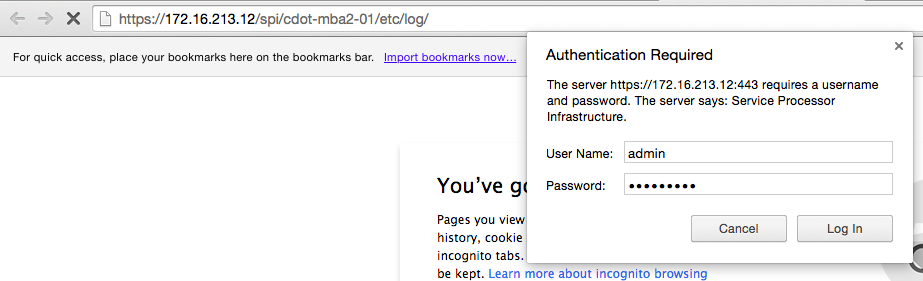
When it’s enabled, all you need to do is navigate to the right URL and enter the appropriate credentials. The format of the URLs looks like this:

SPI_Login_Prompt

SPI_Logs

The service is accessed via the cluster management IP (or name – you can use the friendly DNS name and not IP), but the logs you’ll be going to are those on each individual node in the cluster. This is giving you access to far more logs than are available through the normal event logs displayed in OnCommand System Manager or via the CLI. In a later post, we’ll go through some of the more interesting and important log files you can access.

With Data ONTAP 8.2.1, the built-in admin account has access to this service by default. If you would like to create another user only for accessing these files (for a junior operator, for example) it’s a simple matter:

  • security login create -username <logviewer> -application http -authmethod password

And then enter the password for this new user account.


If you are running versions of clustered Data ONTAP between 8.1.1 – 8.2, here are the steps you’ll need to follow to enable this functionality:

  • vserver services web modify -vserver * -name spi -enabled true
    • This enables the SPI service on all vservers (only necessary for the cluster and node management vservers)
  • vserver services web access create -name spi -role admin -vserver <cluster-name>
    • This grants the admin role access to the SPI web service.
  • vserver services web access create -name compat -role admin -vserver <cluster-name>
    • This grants the admin role access to the compat web service.
    • In my testing, this setting was not strictly necessary for accessing the log files, but it is recommended by NetApp Support.

The official NetApp Knowledge Base article for setting up access is here: https://kb.netapp.com/support/index?page=content&id=1013814


Looking forward to NetApp Insight EMEA 2014

In a little more than one week I’ll be getting on a plane to head to Berlin for NetApp Insight EMEA 2014. I’ve never been to Europe, other than to the UK (does that *really* count as Europe?), so I’m quite looking forward to the experience. While I don’t expect to have a lot of time to sightsee, I definitely plan on exploring the city as much as I can. After all, how can one visit your ancestral homeland & not at least take a peek around?

This year the conference is being held November 17th – 20th at CityCube Berlin, and it marks the first conference for our European customers (following the first US conference for customers last week in Las Vegas). I expect to feel just as much energy and excitement from them as we did from the customers who attended Insight US in Las Vegas last week.

Whether you’re a customer, partner, or NetApp employee there will be a ton of opportunities to learn and things to do at Insight:

  • 22 Hand-on Labs
  • 7 on-site NetApp technical certification exams
    • NS0-145 NetApp Certified Storage Associate (NCSA)
    • NS0-170 FlexPod Design
    • NS0-155 NetApp Certified Data Administrator (NCDA) for Data ONTAP 7-Mode
    • NS0-159 NetApp Certified Data Administrator (NCDA) for clustered Data ONTAP
    •  Ns0-502 NetAp Certified Implementation Engineer – SAN for Data ONTAP 7-Mode
    • Ns0-504 NetAp Certified Implementation Engineer – SAN for clustered Data ONTAP
    • Ns0-510 NetAp Certified Implementation Engineer – Backup and Recovery
  • NetApp University Get Certified Prep Sessions – to help you prepare to take a NetApp certification exam
  • Insight Central – a solutions exchange populated with over 50 partner booths, NetApp booths, Media Hub, and more
  • Hundreds of Breakout Sessions
  • Plus General Sessions, networking events, parties, and more

NetAppInsightHoL

I’m lucky enough to attend the conference because I have a couple sessions of my own to present:

  • II-3-2000 – OpenStack for the Enterprise: FlexPod with Red Hat Enterprise Linux OpenStack Platform
    • Wednesday, Nov 19, 11:15 AM – 12:15 PM in M7 – Level 3
    • Thursday, Nov 20, 1:30 PM – 2:30 PM in M5 – Level 3
  • II-2-1931 – NetApp and Cisco Validated Designs for Service Providers and Large Enterprises
    • Wednesday, Nov 19, 8:30 AM – 9:30 AM in R13 – Level 3
    • Wednesday, Nov 19, 1:45 PM – 2:45 PM in M6 – Level 3

If you haven’t registered for Insight yet, or haven’t scheduled all of your sessions yet, there’s still time! Go here and get registered: https://netappinsight2014emea.activeevents.com/portal/newreg.ww

You can also get more information on the main website: http://www.netappinsight.com.

Whether you’re attending in person or not, be sure to follow the Twitter hashtag #NTAPinsight: we blew up the feed pretty well last week for the US conference and we’re going to do the same for Europe!

If you are attending Insight, please say hello – I’m looking forward to meeting many of you either at my sessions or at other points throughout the conference!

FlexPod Datacenter with NetApp All-Flash FAS and VMware Horizon (with View)

NetApp and Cisco, in conjunction with VMware, have recently released a NetApp Verified Architecture (NVA) Design Guide for deploying VMware Horizon View in a FlexPod environment: NVA-1110-FP-DESIGN. This is the first official FlexPod document for running VMware’s virtual desktop infrastructure software in approximately 2 years, and highlights the latest technologies.

NVA

An NVA is the NetApp equivalent of a Cisco Validated Design (CVD): a pretested, preintegrated and verified architecture that includes prescriptive guidance to help improve the efficiency and efficacy of architecting and implementing NetApp solutions. An NVA can include one or more documents focused on design, deployment, operations, or sizing. This NVA solution will include both a Design Guide (the current document) as well as a Deployment Guide (this document will be published shortly).

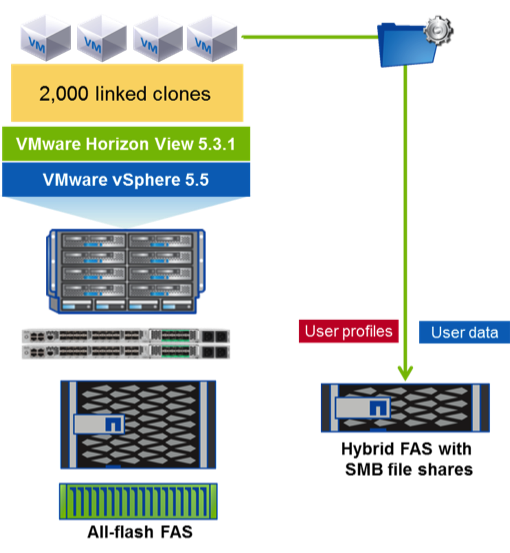
This NVA release focuses on the following software versions:

  • VMware Horizon View 5.3.1
  • VMware vSphere 5.5
  • NetApp clustered Data ONTAP 8.2.1
  • Cisco UCS Manager 2.2(1c)

The hardware in this release was comprised of

  • NetApp All-Flash FAS8060 with DS2246 disk shelves
  • Cisco Nexus 5548UP switches
  • Cisco UCS 6248 Fabric Interconnects
  • Cisco UCS 5108 chassis with 2208XP IOXM
  • Cisco UCS B200 M3 servers

In addition to using the latest software versions (at the time verification testing began), this is the first FlexPod NVA/CVD for VMware Horizon View to use clustered Data ONTAP, as well as the first to use the new All-Flash FAS storage arrays.

This verified architecture utilized a single all-flash HA pair/cluster to easily support 2000 concurrent desktops. A second hybrid HA pair/cluster was used for the infrastructure and user data workloads as an example of using distributed storage clusters. Alternatively, both desktop and infrastructure/user data workloads could have been run on the single all-flash HA pair alone given the performance and capacity headroom available in the system as configured.

NVA-1100-FP_architecture

NetApp has been implementing flash technologies for what are now known as hybrid storage arrays (combining traditional SAS or SATA hard drives with flash) since 2009 and solid-state drives (SSDs) since 2010. In 2013 NetApp entered the all-flash array market with the launch of the EF540, an all-flash model of the E-Series storage arrays.  Now in 2014 NetApp is shipping all-flash configurations of its most popular product, the FAS series arrays.

In hindsight everything is obvious, including how well Data ONTAP’s core technologies like its Write Anywhere File Layout (WAFL) and use of NVRAM, enhance an all-SSD environment. With Data ONTAP, all incoming writes are cached in memory, logged to NVRAM in both the primary and partner controllers, and acknowledged back to the host immediately to provide very low response time and low latency for write operations. Data is then flushed from cache to disk (in this case SSD) using algorithms to optimize the data layout and coalescing writes (including highly random writes as are typically seen in virtual and virtual desktop environments) into large sequential stripes of across all disks at once. As WAFL always writes to free space rather than performing in-place overwrites, it provides a natural form of wear-leveling for the SSDs while still leveraging the garbage collection and wear-leveling within each SSD itself. These features help extend the life of each SSD so that NetApp is able to offer three-year standard warranty and up to an additional two-years of extended warranty (five-year warranty total) for SSD with no restrictions around number of drive writes. In addition, the thread parallelism and multi-core support continually enhanced in the last several versions of Data ONTAP combines with the powerful multi-core CPUs used in the FAS8000 series controllers to provide truly impressive l0w-latency, high IOP performance.

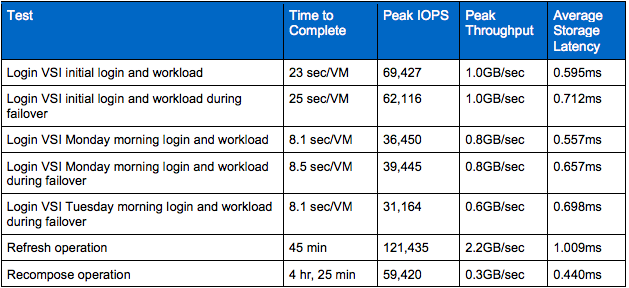
NetApp has used Login VSI, the industry-recognized standard for VDI workload testing, to perform an extensive series of verification testing of the All-Flash FAS f0r multiple VDI architectures. Each of the following technical reports are loaded with test plan details and results which demonstrate the combination of sustained high IOPs and low latencies consistently seen throughout the testing:

  • NetApp All-Flash FAS Solution For Nonpersistent Desktops with VMware Horizon View (TR-4307)
  • NetApp All-Flash FAS Solution For Persistent Desktops with VMware Horizon View (TR-4335)
  • NetApp All-Flash FAS Solution For Persistent and Nonpersistent Desktops with Citrix XenDesktop and XenApp (TR-4342)

For the architecture used by this NVA solution, here is one sample of the test results:

Screen Shot 2014-11-05 at 11.45.31 PM

As mentioned at the beginning of this article, keep an eye out for the matching NVA Deployment Guide for this solution coming soon!


CLI Efficiency: Common Basics

I like the command line. I like the keyboard.  For me it’s all about the efficiency: if done right, it’s just faster & easier to use the keyboard to tell the computer what to do than it is to use the mouse to show it. (Yes, there are exceptions – it’s usually easier to do graphics work with a mouse, for example.)

The first time I ever got really excited on a computer was when someone started showing me all of the keyboard shortcuts available at the time. I immediately found myself substantially more productive, and that productivity just fueled a desire to learn even more shortcuts, more tips and tricks, and to find the most efficient way to do whatever it is I needed to do on the computer.

While there are many different keyboard shortcuts available, depending on the application or the shell, there are also many similar ones. Even an unintuitive interface or standard is useful when it is common: learn once and use (almost) everywhere. One of those standards is the line-editing functionality most often implemented using the GNU Readline library or one of its functional (but differently licensed) equivalents like Haskeline, Editline, vrl, or others. In a nutshell: these libraries provide a common user interface for interacting with a command line and editing its contents using special keystrokes or key combinations. In what may be no surprise to those familiar with GNU, these key combinations are very reminiscent of Emacs and tend to utilize the Control key extensively.

Readline actually dates back to 1987 and either it or one of its equivalents has been available for most of the vast number of command line shells ever since. This is true for both general purpose operating systems like Linux and Mac OS X (both of which include the Bash shell which uses Readline), or for purpose-specific or embedded operating systems like VMware’s ESXi (with its Busybox shell), Cisco’s NX-OS, NetApp’s Data ONTAP, or many others. Once you become familiar with the basics of these keystrokes, you’ll be able to be more efficient in virtually any CLI environment (with the notable exception of Windows, although there is a project even for that – WinEditLine).

Note: the list below is not all-encompassing, but includes the key combinations that appear to be supported consistently across platforms. There are other key combinations that work on one or more platforms but not on others; a future post will provide more detailed comparisons for these other key combinations.

Movement:

Keystroke Action
Ctrl+a Move to the beginning of the line
Ctrl+e Move to the end of the line
Ctrl+b Move to the left (back) one character
Ctrl+f Move to the right (forward) one character
Esc-b Move to the left (back) one word
Esc-f Move to the right (forward) one word
Ctrl+p Display previous command (in history buffer)
Ctrl+n Display next command (in history buffer)

Editing:

Keystroke Action
Ctrl+d Delete the character under the cursor
Ctrl+w Delete the word to the left of the cursor
Ctrl+k Delete all characters from the cursor to the end of the line
Ctrl+u Delete all characters from the cursor to the beginning of the line